書き出した図版はどう確認する?
PDFは掲載時の大きさで開き、パネルの記号、目盛り、軸ラベルを確認します。画像形式で提出する場合は、PNGの実際のピクセル数も確認してください。この例では切り上げ後の幅と高さを、PNGの書き出し時にピクセル単位で指定します。
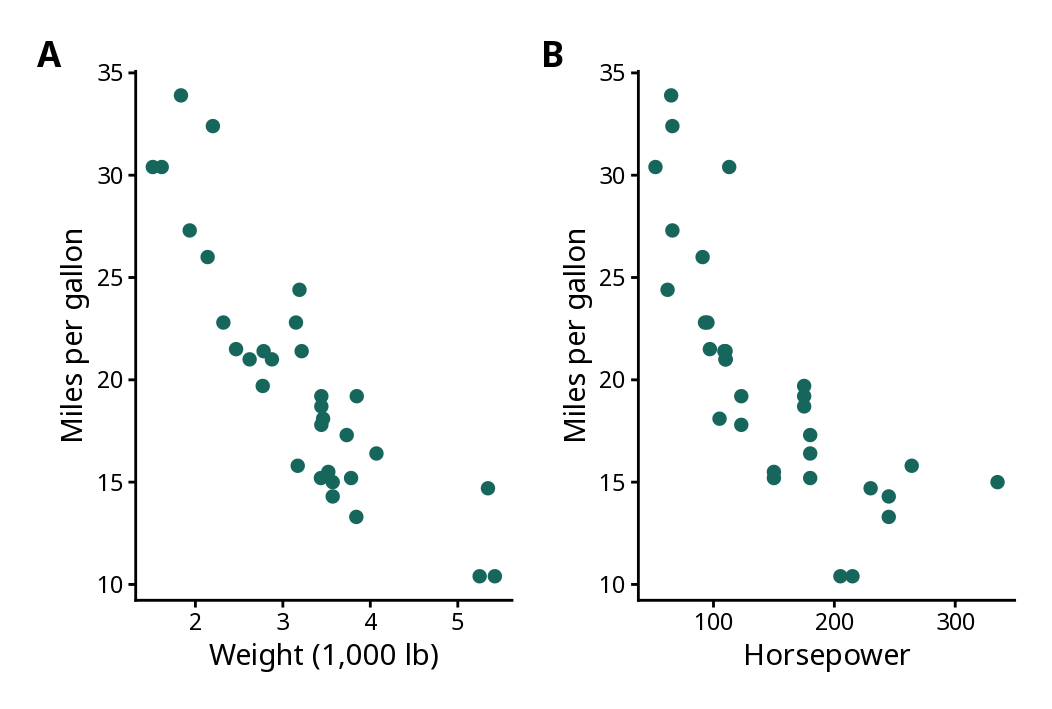
ここでは、Rに付属するmtcarsデータから散布図を2枚作り、patchworkで横に並べます。ggplot2とpatchworkが未導入の場合は、先にインストールしてください。出力ファイルはRの作業フォルダーに保存されます。
そのまま実行できるRコード
library(ggplot2)
library(patchwork)

theme_figure <- theme_classic(base_size = 7) +
  theme(plot.tag = element_text(face = "bold"))

panel_a <- ggplot(mtcars, aes(wt, mpg)) +
  geom_point(size = 1.2, colour = "#17665c") +
  labs(x = "Weight (1,000 lb)", y = "Miles per gallon") +
  theme_figure

panel_b <- ggplot(mtcars, aes(hp, mpg)) +
  geom_point(size = 1.2, colour = "#17665c") +
  labs(x = "Horsepower", y = "Miles per gallon") +
  theme_figure

figure <- (panel_a | panel_b) + plot_annotation(tag_levels = "A")
ggsave("figure.pdf", figure, width = 89, height = 60, units = "mm")
ggsave("figure.png", figure, width = 1052, height = 709, units = "px", dpi = 300)