bop
Bopbun Block Puzzle: Controls, Line Clears and Scoring
Learn how to place fixed shapes, clear rows and columns together, and count a 21-point cross-clear in an illustrated example.
Choose a piece, then choose its anchor on the board. Every square of the shape must fit inside the grid without overlapping filled squares. Complete rows and columns clear together. Each placed square earns 1 point, with 10 extra points for each cleared line.
Bopbun's block puzzle uses an eight-by-eight grid and three piece slots. A round starts with an empty grid and three dealt pieces. There is no countdown, so check the available space before committing a placement.
Choose a piece, then a board position
- Tap or click Piece 1, Piece 2 or Piece 3 to select a shape. Its orientation stays as shown in the tray.
- Tap or click a board square to use it as the shape's anchor. This player uses separate selections; dragging is not a placement control.
- With a mouse, hover over an anchor to preview the placement. Keyboard focus also shows a preview. These previews leave your score, board and pieces unchanged.
- For keyboard play, use Tab to reach a piece button and Enter or Space to select it. Tab to the board, use arrows to move focus, then Enter or Space to place. Home and End reach the current row's ends; Escape clears the preview.
Understand the anchor before placing
The anchor is the top-left corner of the shape's outer rectangle. Each part of the shape extends from that position. A piece may have an empty corner, so the anchor square itself can already be filled if none of the piece's actual squares overlap it.
The game does not rotate, flip or slide a piece into a nearby gap. Check the whole shape against the board edge. If a placement overlaps another square or extends beyond the grid, it is rejected and the piece remains available. Placed squares stay until a completed line clears them.
How line clears add to the score
A row clears when all eight of its squares are filled. A column clears under the same rule. The game checks both directions after a placement and clears all completed rows and columns together. An intersection square is removed once. Other squares remain in their positions, with no falling blocks.
Add 1 point for each square you place, then 10 points for every completed row or column. Placing a three-square piece without a clear earns 3 points. The placement count increases once for that whole piece.
An illustrated 21-point cross-clear
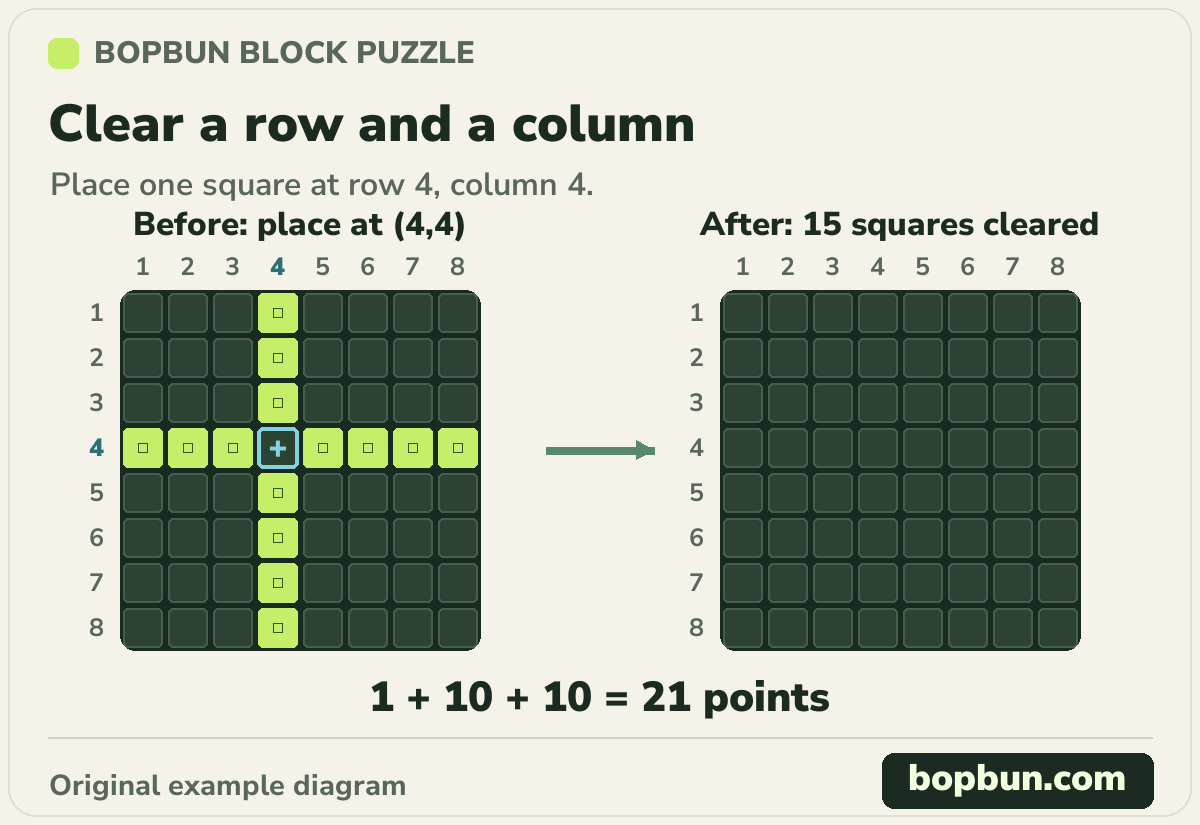
This illustrated example board was authored to explain simultaneous clears. It cannot be selected in the player; ordinary rounds start with an empty grid. Count rows from the top and columns from the left, starting at 1.
In the illustration, row 4 and column 4 are each missing their shared square at row 4, column 4. Piece 1 contains one square.
- Select the single-square piece shown in Piece 1.
- Place it at row 4, column 4 to complete both lines.
- Count 1 point for the placed square, 10 for the row and 10 for the column: 21 points.
The clear removes 15 squares: eight in the row and eight in the column, sharing one intersection. Those removed squares add no separate points. The example score becomes 21 after one placement, and the other two tray pieces remain available.
Use the remaining pieces before the next batch
A used slot displays Used and cannot be selected again. The other slots keep their shapes. Three pieces are dealt only after all three current slots have been used; a tray can include repeated shapes.
If your selected piece has no legal position, inspect the other unused slots. The round continues while any remaining piece fits somewhere. After the third placement, the game deals the next batch before checking its available positions. The round ends when none of the available pieces can fit.
Start again and know what resets
New round clears the board, resets the score and placement count, and deals three pieces. Use it whenever you want a fresh attempt, including after running out of space.
The current board and results are not saved or synced to an account. Refreshing the page starts another round and loses that progress. Keep the page open while working on an attempt.